


%20(1).avif)


Synchro Arts
Save hours in the studio with vocal processing software created specifically to enhance and simplify the processes of music producers and audio engineers.

Vocal layering is one of the most tried and true ways to add depth to any vocal passage.
Whether it’s used throughout a song or just at the climactic moments, adding layers makes vocals sound bigger, wider, and more exciting.
But arranging, recording, and producing great vocal stacks takes more than just duplicating a track and adding reverb.
To get the polished sound you hear in professional mixes, you need to pay attention to pitch, timing, arrangement, instrumentation and processing.
In this guide, we will walk through five key techniques plus some mixing strategies that will take your vocal stacks from flat to three-dimensional.
Vocal doubling has long been a method used by producers to thicken vocals and add a natural chorus effect to vocal parts.
Of course, the best way to create a vocal double is to record a second vocal over the main vocal part.
We’ve shared tips and tricks for producing great vocal doubles in one of our past articles, but the key is to make sure both vocals are in tune and in time.
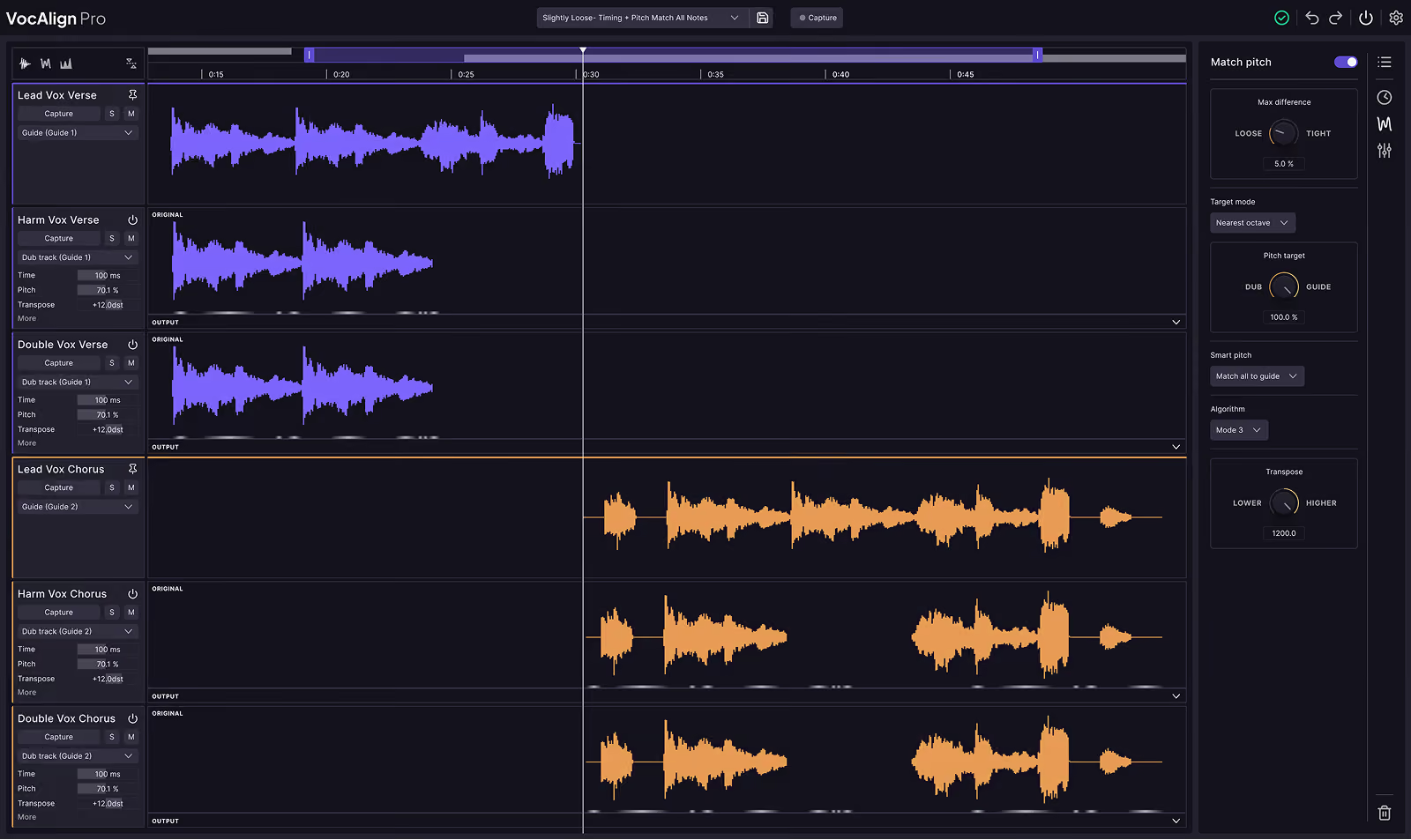
Timing and pitch alignment can be done manually, but both processes are often very time-consuming.
Luckily, Revoice Pro 5 is an incredibly effective tool that aligns and tunes vocals automatically in seconds. Give it a try if you haven’t seen it work its magic!
Stacking harmonies instantly makes vocals feel like a moment in the production rather than just a single line.
Start with simple intervals like thirds and fifths above or below the melody. You can expand the stack with sevenths, octaves, or even counter melodies if you want a more choir-like feel.
If you are writing on the fly, have the vocalist sing along to the lead until they find notes that feel supportive but distinct. Record multiple passes of each harmony for more weight.
When the singer is not available, pitch-shifting tools can generate harmonies.
Tools like Revoice Pro 5 and RePitch enable you to duplicate the lead vocal and pitch-shift it into any melody line you compose.
Just remember that digital harmonies are usually best mixed behind real vocals, rather than replacing them if you want a natural, human sound.
Using the same vocalist to record harmonies and doubles can make the overall vocal stack sound flat.
To add extra depth and create a convincing choir sound, it’s best to record a few background vocalists, since extra voices can add depth, especially if you mix men's and women’s voices.
Of course, introducing a lot of voices also creates a bigger vocal stack, so you will have a lot more timing alignment work to do.
Luckily, alignment plugins like VocAlign and Revoice can speed up the alignment process.
If no other singers are available, simulate variety by changing mic distance, recording location or using a different mic.
Having the same vocalist experiment with different vocal styles — like whispery, chesty, or nasal — can also create tonal shifts that mimic the effect of multiple voices.
Once you have doubles and harmonies stacked, panning them across the stereo field is what makes the stack sound huge.
Keep the lead vocal in the center, then spread doubles and harmonies left and right.
A common approach is to pan doubles around 30% left and right and push harmonies wider, around 60%.
Avoid hard-panning every element. This creates a hole in the middle and can disconnect the vocals from the mix. Instead, think of the stereo field as a stage and place singers so they blend naturally.
For more energy, automate panning. Narrow your stacks in the verse and widen them in the chorus to make the vocal arrangement follow the dynamics of the song.
Reverb and delay are essential for giving stacked vocals a sense of space.
Start with a short plate reverb to glue the vocals together.
Then add a longer hall or chamber reverb to push some layers further back.
For delay, try subtle eighth-note or quarter-note echoes on background vocals while keeping the lead relatively dry.
Dedicated plugins like LANDR VoxVerb, Valhalla Delay, or Soundtoys EchoBoy are excellent choices for shaping reverb and delay specifically for vocals.
A good practice is to send all vocal layers to a shared reverb or delay bus instead of putting individual effects on each track.
This creates the feeling that all vocals exist in the same room. Use EQ on the effects return to cut lows and tame highs so the reverb does not cloud the mix.
Layering is not just about recording more tracks. Mixing is what turns them into a cohesive performance.
Start by setting levels so the lead sits clearly in the front while doubles and harmonies support it without overpowering it.
Use EQ to roll off low frequencies on background layers and to carve space for the lead vocal in the midrange.
EQ plugins designed with vocals in mind like LANDR VoxChain, Audified 1A or NEED 73 are great plugins to introduce for light EQ tasks like these.
Compress groups of vocals together by routing them to buses such as doubles, harmonies, and background vocals.
Light compression with gentle ratios will glue the layers without crushing their dynamics. Audified’s Telefunken-style compressor plugin is a great option for light compression on vocals.
Adding subtle saturation can also help unify the stack and give it warmth.
Tape or tube-style plugins like Audified U78 Saturator or Baby Audio TAIP are great plugins for tasks like this.
Finally, control the lead vocal with volume automation to make sure it always stays present, and automate harmony levels to emphasize key moments in the song.
Great vocal stacks do not happen by accident. You have to build them with intention.
From recording true doubles to carefully arranging harmonies, panning layers, and mixing them with effects, each step contributes to the final polished sound.
With the right approach and the right tools, you can transform a single vocal line into a lush wall of sound that feels professional and powerful.
And when it comes time to finish the job, vocal alignment tools like VocAlign and Revoice Pro 5 can make tedious alignment processes so much faster and easier.

Alex Lavoie is a drummer, music producer, songwriter and marketing professional living in Montreal, Quebec.
Save hours in the studio with vocal processing software created specifically to enhance and simplify the processes of music producers and audio engineers.


