

%20(1).avif)



Synchro Arts
Save hours in the studio with vocal processing software created specifically to enhance and simplify the processes of music producers and audio engineers.
Ever since the 60s, when tape machines made their way into major recording studios, overdubbing has been a staple in music making, especially when it comes to vocals.
Because multitracking tape machines had the unique ability to record sound on top of previously recorded material, artists discovered they could layer vocal parts long after the band left the studio.
With modern computer-based DAWs, overdubbing is now standard practice in almost every release, big or small.
It’s safe to say that almost everything you hear on streaming services and radio uses vocals that were dubbed over a previously produced instrumental.
Of course, overdubbing introduces new challenges, mainly keeping timing tight and aligning multiple takes so they feel like one performance.
If you’ve ever struggled to get your vocal stacks to sound professional, this guide will walk you through everything you need to know.
Overdubbing is the process of recording new parts, whether vocals or instruments, over an existing track. It is the technique that lets you build a song layer by layer.
In a vocal session, that might mean singing the same line multiple times to create doubles, recording harmonies on top of the lead, or dropping in ad libs that add character.
Today, overdubbing is easier than ever thanks to DAWs like Ableton, Logic, Pro Tools, and Reaper.
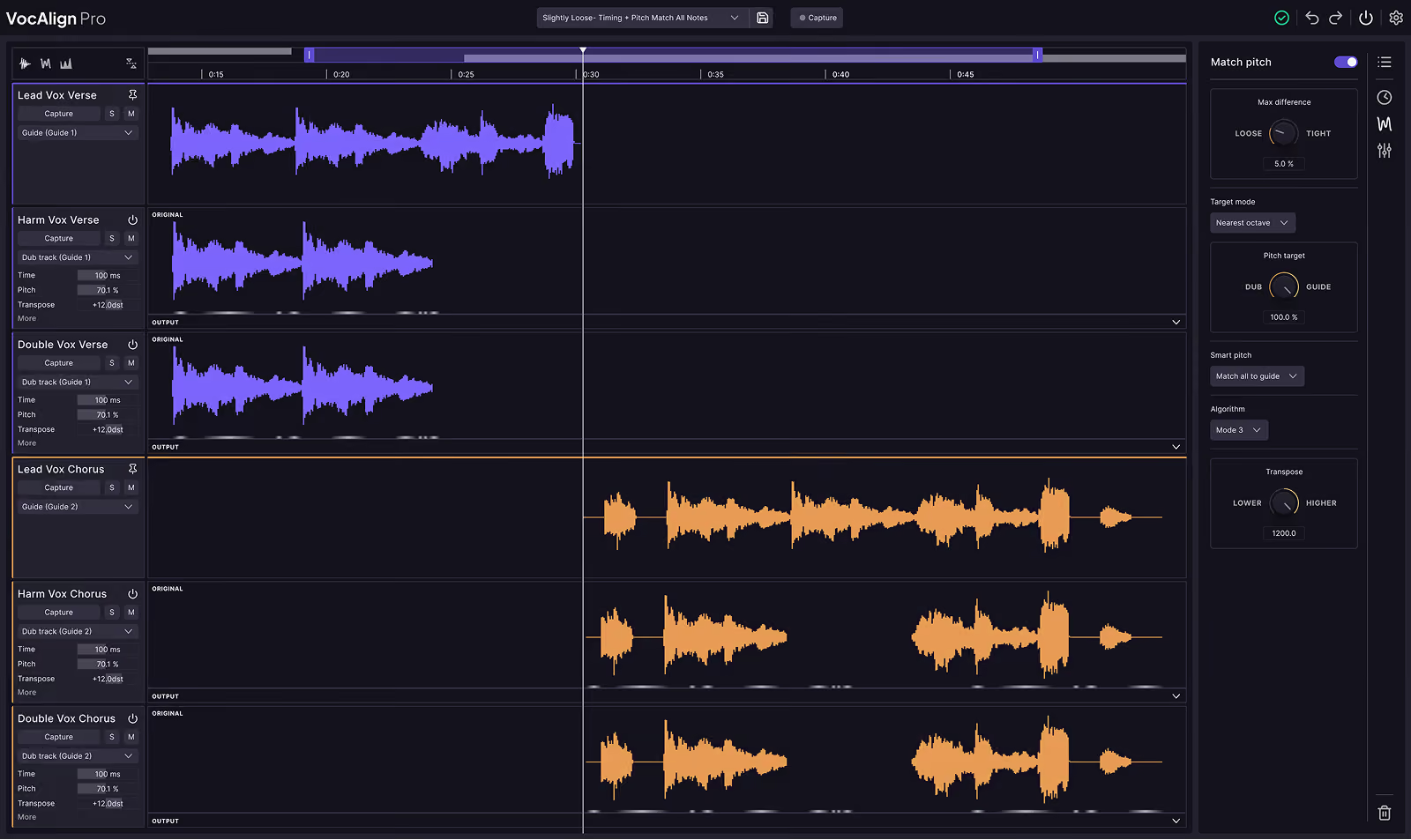
Plus, alignment tools like Vocalign or Revoice Pro make it simple to snap takes together so they sound natural and polished.
Even social media has its own version of overdubbing. Think about TikTok’s duet feature. It is essentially a modern karaoke-style overdub where you sing over someone else’s video.
Producing with overdubs is a basic recording skill that makes a lot of complex music production tasks much easier.
Here’s our best tips for producing better vocal overdubs and beyond.
A strong instrumental foundation is essential before you start overdubbing vocals.
Singers need a near-final version of the recording to sing over to both ensure they get the arrangement right and feel the emotion and essence of the song itself.
If your beat or backing track feels incomplete or messy, overdubbing on top of it will be harder.
Spend time getting your instrumental balanced, with a clear rhythm and chord structure. It doesn’t have to be perfectly mixed, but it should be stable enough for a vocalist to lock in.
When it comes to overdubbing, more is more. Don’t stop at one or two recordings of the same part. Track multiple takes, even if you think you’ve nailed it.
Having options gives you flexibility when editing, while subtle differences in timing, tone, or phrasing can be mixed together to create a bigger sound.
Professional producers often ask singers to run a chorus five, six, or even ten times. Later during the mixing phase, they’ll choose the strongest takes and layer them to achieve a full and polished stack.
Punching in means dropping into the recording only for the part that needs fixing instead of redoing the whole track.
It originates from the tape recording era of the 1960s, where artists would literally “punch in” the tape head at a specific point on the tape to record over a certain passage of a song.
For example, if the singer nailed the verse but messed up one line in the chorus, a quick punch-in at the chorus makes it easy for your singer to re-record that line.
This saves time, preserves the natural energy of the performance, and keeps the session moving.
Most DAWs make this super easy. You just set a pre-roll, hit record, and the artist can jump right in.
Overdubbing is where you get creative. Once the main vocal is locked, experiment with doubles, harmonies, and background parts.
Layering doubles on the chorus can make it sound massive. Adding whispered takes or lower octave layers can create texture. Throwing in harmonies can completely change the mood.
Don’t be shy about stacking parts. Hip-hop, pop, and R&B tracks often use dozens of vocal layers to achieve that polished and professional sound.
Comping is the process of editing the ideal vocal from multiple takes. It’s easily done with editing tools in the DAW.
Instead of choosing one full recording, you select the best parts from each pass and edit them together.
If your first take has the best opening phrase, while take four nails the high note, comping
lets you combine them into one seamless track.
Every DAW has tools for this. Once you’ve built your comp, you’ll have a strong performance to use as the lead vocal.
The final step to professional-sounding overdubs is alignment. Even if your takes are great, small timing differences can make the layers sound messy.
This is where manual editing or plugins come in.
You can manually edit takes in your DAW until they line up, but software like Vocalign or Revoice Pro can save you a lot of time by automatically syncing your vocal stacks.
Tight alignment is what gives vocal stacks that powerful and unified feel, like multiple singers moving as one.
Overdubbing isn’t just a recording trick, it is a cornerstone of modern music production.
From The Beatles experimenting on tape machines to today’s producers building massive vocal stacks in the DAW, it’s what allows songs to sound full, exciting, and professional.
With a solid instrumental, multiple takes, creative layering, smart comping, and alignment tools like VocAlign and Revoice Pro, you can turn raw vocal performances into something that competes with what you hear on streaming playlists.

Alex Lavoie is a drummer, music producer, songwriter and marketing professional living in Montreal, Quebec.
Save hours in the studio with vocal processing software created specifically to enhance and simplify the processes of music producers and audio engineers.


